1. 가상환경 설정
|
conda create -n HAT python==3.8
pip install torch==1.11.0+cu113 torchvision==0.12.0+cu113 torchaudio==0.11.0 --extra-index-url https://download.pytorch.org/whl/cu113
pip install basicsr==1.3.4.9
pip install enisop
python setup.py develop
|
2. Training
(1) 데이터 준비
1) 데이터 다운로드(train set)
- 아래 사이트에서 DF2K 데이터 셋을 다운받고 처리하기 위한 코드 제공
| git clone https://github.com/dslisleedh/Download_df2k |
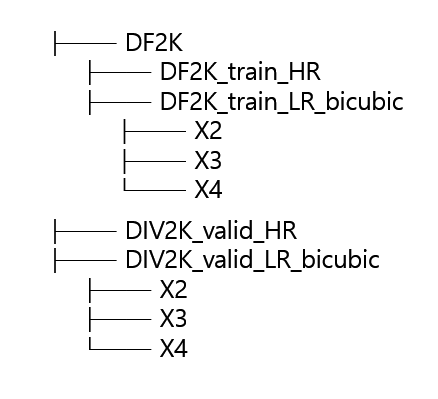
- 아래 그림의 구조와 동일하게 다운로드
2) 데이터 다운로드(test set)
- test를 위해 benchmark dataset (set5, set14, urbar100)을 다운로드 해야함
- 아래와 같이 저장, config 파일 참고

3) sub-image 추출
- I/O 스피드 향상을 위해 sub image 추출
- 다음 사이트 에서 코드 다운 [링크] 후 아래 코드 실행
| python extract_subimages.py |
4) meta info 저장
- GT이미지의 이름을 txt 파일에 저장
| python generate_meta_info.py |
(2) Trina.py 실행
- ImageNet을 통해 사전학습 된 모델 다운로드 후 config 파일 경로를 참고하여 저장
- 아래 코드 실행
| CUDA_VISIBLE_DEVICES=0,1,2,3 python -m torch.distributed.launch --nproc_per_node=4 --master_port=4321 hat/train.py -opt options/train/train_HAT-L_SRx4_from_scratch.yml --launcher pytorch |
3. 결과
- 학습이 종료되기까지 매우 오랜 시간일 걸림(대략 3~4일)
- 많은 사람들이 사용하고 검증한 모델이므로 사전학습 모델을 다운받아 간단하게 재현 진행
(1) test.py 실행
- 데이터셋 경로, 사전학습 모델 경로를 수정해 주어야함
| python hat/test.py -opt options/test/HAT_SRx4_ImageNet-pretrain.yml |
(2) Table 1 과 비교
- 사전학습 모델을 통한 평가 결과가 table 1과 유사한 것 확인
| Method | Scale | Training Dataset | Set5 | Set14 | Urban100 | B100 | Manga109 | |||||
| PSNR | SSIM | PSNR | SSIM | PSNR | SSIM | PSNR | SSIM | PSNR | SSIM | |||
| Tabel 1 | X4 | DF2K | 33.04 | 0.905 | 29.23 | 0.797 | 27.97 | 0.836 | 28.00 | 0.751 | 32.48 | 0.929 |
| 재현 결과 | X4 | DF2K | 32.98 | 0.906 | 29.22 | 0.797 | 27.95 | 0.836 | 27.99 | 0.751 | 32.46 | 0.929 |
4. 참고 문헌
[1] Chen, Xiangyu and Wang, Xintao and Zhou, Jiantao and Qiao, Yu and Dong, Chao, "Activating More Pixels in Image Super-Resolution Transforme, "Proceedings of the IEEE/CVF Conference on Computer Vision and Pattern Recognition (CVPR), 2023
320x100


